
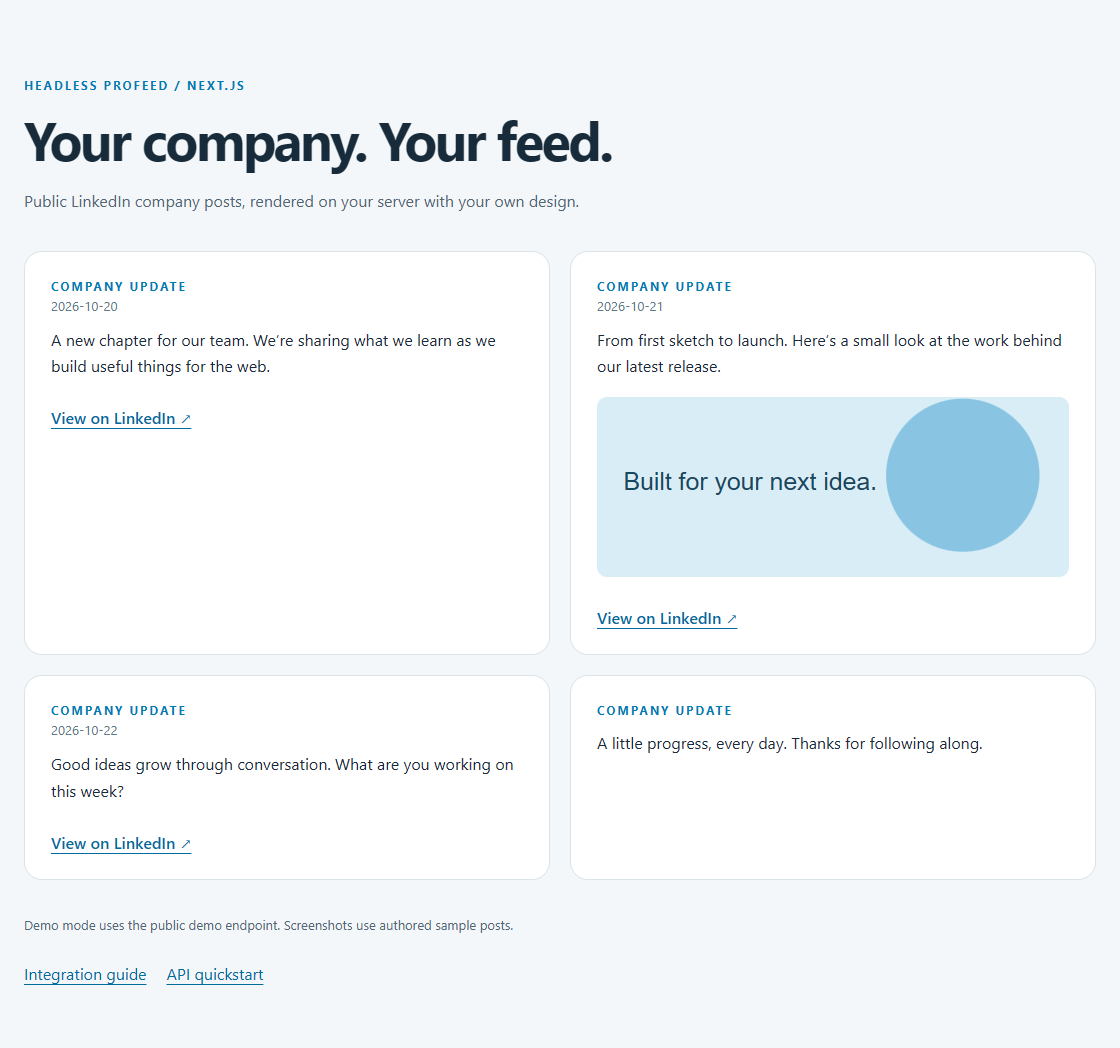
What you will build
This example renders up to four public LinkedIn company posts in a Next.js App Router server component. Your server calls Headless Profeed with a secret key and returns styled cards. Visitors receive the rendered posts, never the key. There is no client-side feed-fetching component to configure.
Headless Profeed is an independent service, not LinkedIn’s official API. Connect only public company or showcase pages you own or are authorized to use. Personal profiles and private posts are unsupported. Start with how to retrieve posts as JSON if you are comparing API options.
Prerequisites
- Node 22.23.4 or later and npm.
- The example is tested with Next.js 16.4.3 and React 19.3.1.
- For customer mode: an active subscription, connected feed ID and
hp_sk_secret server key. Explicit demo mode requires no customer credentials. - A Next.js deployment that supports a server runtime; this example is not a static export.
1. Install and run the example
git clone https://github.com/ProFeedWP/headless-profeed-examples.git
cd headless-profeed-examples/nextjs
npm ci
cp .env.example .env.local
npm run dev
On PowerShell use Copy-Item .env.example .env.local. Open the local URL printed by Next.js. Demo mode explicitly selects the public demo endpoint; missing customer credentials never fall back to demo content.
nextjs/.env.example
# Explicit demo mode. No credentials are needed for the public demo.
PROFEED_MODE=demo
# For your own feed, set mode=customer and uncomment both settings below.
# PROFEED_FEED_ID=YOUR_FEED_ID
# PROFEED_SECRET_KEY=YOUR_SECRET_KEY
# Browser keys must allow the EXACT origin shown by your local server.
For your own Page, connect a feed, create a secret key and set PROFEED_MODE=customer. Uncomment and fill PROFEED_FEED_ID and PROFEED_SECRET_KEY. Restart the dev server. Put the secret in your hosting provider’s server environment before deployment. Never prefix it with NEXT_PUBLIC_, serialize it into props for a client component, or commit .env.local.
2. Render from a server component
The page reads environment variables on the server. The route is dynamic, and the helper uses cache: 'no-store'. That makes the starting behavior explicit: each page request reads the API’s existing cached feed without adding a Next.js persistent data cache.
nextjs/app/page.tsx
import { configuration, readFeed } from "../lib/feed.mjs";
export const dynamic = "force-dynamic";
export default async function Page() {
  let result: {
    state: string;
    posts: {
      id: string;
      text: string;
      date?: string;
      url?: string;
      image?: string;
    }[];
    message?: string;
    retryAfter?: number;
    stale?: boolean;
  };
  try {
    result = await readFeed(
      configuration({
        mode: process.env.PROFEED_MODE,
        feedId: process.env.PROFEED_FEED_ID,
        key: process.env.PROFEED_SECRET_KEY,
        base: process.env.PROFEED_API_URL,
      }),
    );
  } catch (error) {
    result = {
      state: "error",
      posts: [],
      message:
        error instanceof Error ? error.message : "Check your configuration.",
    };
  }
  return (
    <main>
      <p className="eyebrow">Headless Profeed / Next.js</p>
      <h1>Your company. Your feed.</h1>
      <p className="intro">
        Public LinkedIn company posts, rendered on your server with your own
        design.
      </p>
      <section aria-label="Company posts" data-state={result.state}>
        {result.message && <p className="status">{result.message}</p>}
        {result.state === "pending" && (
          <p>Wait {result.retryAfter} seconds before reloading this page.</p>
        )}
        {result.state === "error" && result.retryAfter && (
          <p>Wait at least {result.retryAfter} seconds before retrying.</p>
        )}
        {result.stale && (
          <p>Showing cached posts while the source refreshes.</p>
        )}
        <div className="feed">
          {result.posts.map((post) => (
            <article className="post" key={post.id}>
              <div className="eyebrow">Company update</div>
              {post.date && <time dateTime={post.date}>{post.date}</time>}
              <p>{post.text}</p>
              {post.image && (
                <img
                  src={post.image}
                  alt=""
                  loading="lazy"
                  referrerPolicy="no-referrer"
                />
              )}
              {post.url && (
                <a href={post.url} target="_blank" rel="noreferrer">
                  View on LinkedIn ↗
                </a>
              )}
            </article>
          ))}
        </div>
      </section>
      <footer>
        Demo mode uses the public demo endpoint. Screenshots use authored sample
        posts.
      </footer>
      <nav className="links">
        <a href="https://headless.profeedwp.com/guides/nextjs-linkedin-feed">
          Integration guide
        </a>
        <a href="https://headless.profeedwp.com/docs">API quickstart</a>
      </nav>
    </main>
  );
}
The page distinguishes pending collection from a completed empty feed. In this server-rendered version, the visitor receives a message and retry interval, then can reload after waiting. It does not start a browser polling loop. Text renders as React text nodes; optional images and dates appear only when available.
3. Add the API helper
The helper checks 202 before response.ok, validates the expected JSON shape and limits the result to four posts. It rejects a publishable key in server customer mode and gives a clear configuration error. Only HTTPS media and valid LinkedIn post URLs are accepted; loopback HTTP is allowed for the local test fixtures.
nextjs/lib/feed.mjs
export const API_URL = "https://api.profeedwp.com/api/headless-profeed/v1";

export function configuration(env, browser = false) {
  const mode = env.mode;
  if (mode !== "demo" && mode !== "customer")
    throw new Error("Set the feed mode to demo or customer. See .env.example.");
  const base = (env.base || API_URL).replace(/\/$/, "");
  const url = new URL(base);
  if (
    url.protocol !== "https:" &&
    !(url.protocol === "http:" && url.hostname === "127.0.0.1")
  )
    throw new Error(
      "The API URL must use HTTPS (127.0.0.1 is allowed for fixture tests).",
    );
  if (mode === "demo") return { url: base + "/demo", headers: {} };
  if (!env.feedId || !/^[a-zA-Z0-9-]+$/.test(env.feedId))
    throw new Error(
      "Customer mode requires a feed ID. Copy it from your account.",
    );
  if (!env.key?.startsWith(browser ? "hp_pk_" : "hp_sk_"))
    throw new Error(
      browser
        ? "Customer browser mode requires a publishable key (hp_pk_), never a server key."
        : "Customer server mode requires a secret key (hp_sk_). Keep it server-only.",
    );
  return {
    url:
      base + "/feeds/" + encodeURIComponent(env.feedId) + "/posts?page_size=4",
    headers: { "X-API-Key": env.key },
  };
}

export function safeUrl(value, linkedin = false) {
  if (typeof value !== "string") return undefined;
  try {
    const url = new URL(value);
    if (linkedin)
      return url.protocol === "https:" &&
        (url.hostname === "linkedin.com" ||
          url.hostname.endsWith(".linkedin.com"))
        ? url.href
        : undefined;
    return url.protocol === "https:" ||
      (url.protocol === "http:" && url.hostname === "127.0.0.1")
      ? url.href
      : undefined;
  } catch {
    return undefined;
  }
}

export function retrySeconds(header, fallback = 30, now = Date.now()) {
  if (!header) return fallback;
  const seconds = /^\d+$/.test(header)
    ? Number(header)
    : Math.ceil((Date.parse(header) - now) / 1000);
  return Number.isFinite(seconds) ? Math.max(1, seconds) : fallback;
}

// 202 is an HTTP success but collection has not completed yet.
export async function readFeed(config, signal) {
  const controller = new AbortController();
  const timeout = setTimeout(() => controller.abort(), 15000);
  const abort = () => controller.abort();
  signal?.addEventListener("abort", abort, { once: true });
  if (signal?.aborted) controller.abort();
  try {
    const response = await fetch(config.url, {
      headers: config.headers,
      cache: "no-store",
      credentials: "omit",
      signal: controller.signal,
    });
    const body = await response.json().catch(() => null);
    const retryAfter = retrySeconds(
      response.headers.get("Retry-After"),
      body?.retry_after_seconds || 30,
    );
    if (response.status === 202)
      return {
        state: "pending",
        posts: [],
        retryAfter,
        message:
          "The first collection is pending. Try again after the retry interval.",
      };
    if (!response.ok) {
      const message =
        response.status === 401
          ? "Invalid API key. Replace it in your environment."
          : response.status === 403
            ? "Access denied. Check your subscription, selected feed and exact allowed origin."
            : response.status === 429
              ? "Request allowance reached. Wait before retrying."
              : "The feed is temporarily unavailable. Check the feed status and try again later.";
      return {
        state: "error",
        posts: [],
        message,
        status: response.status,
        retryAfter,
      };
    }
    if (body?.success !== true || !Array.isArray(body.posts))
      return {
        state: "error",
        posts: [],
        message: "The API returned an unexpected response.",
        retryAfter,
      };
    const posts = body.posts.slice(0, 4).map((post, index) => {
      const date =
        typeof post.date_published === "string"
          ? new Date(post.date_published)
          : null;
      return {
        id: String(post.id ?? index),
        text: typeof post.text === "string" ? post.text : "",
        date:
          date && !Number.isNaN(date.valueOf())
            ? date.toISOString().slice(0, 10)
            : undefined,
        url: safeUrl(post.post_url, true),
        image:
          safeUrl(post.image_url) ||
          safeUrl(post.media_items?.find((m) => m.type === "image")?.url),
      };
    });
    return {
      state: posts.length ? "ready" : "empty",
      posts,
      stale: body.refresh?.stale === true,
      message: posts.length
        ? ""
        : "No published posts are available for this feed yet.",
    };
  } catch (error) {
    if (signal?.aborted) throw error;
    return {
      state: "error",
      posts: [],
      message:
        "The feed could not be reached. Check your connection and API configuration.",
      retryAfter: 30,
    };
  } finally {
    clearTimeout(timeout);
    signal?.removeEventListener("abort", abort);
  }
}
4. Add layout, styling and project configuration
These files complete the app. Clone the repository to use its committed lockfile and tests, rather than reconstructing a dependency tree from a package manifest alone.
nextjs/app/layout.tsx
import "./style.css";
import type { ReactNode } from "react";
export const metadata = {
  title: "LinkedIn feed · Next.js example",
  description: "A server-rendered company feed using Headless Profeed.",
};
export default function Layout({ children }: { children: ReactNode }) {
  return (
    <html lang="en">
      <body>{children}</body>
    </html>
  );
}
nextjs/app/style.css
:root {
  font-family: Inter, system-ui, sans-serif;
  color: #172b3a;
  background: #f4f7f9;
  font-synthesis: none;
}
* {
  box-sizing: border-box;
}
body {
  margin: 0;
}
main {
  max-width: 1120px;
  margin: auto;
  padding: 64px 24px;
}
a {
  color: #006b9f;
  text-underline-offset: 4px;
}
h1 {
  font-size: clamp(32px, 5vw, 54px);
  letter-spacing: -0.045em;
  line-height: 1.08;
  margin: 14px 0 20px;
}
h2 {
  font-size: 20px;
  line-height: 1.4;
}
p {
  line-height: 1.65;
}
.eyebrow {
  text-transform: uppercase;
  font-weight: 700;
  font-size: 12px;
  letter-spacing: 0.16em;
  color: #007bb5;
}
.intro {
  max-width: 620px;
  color: #526675;
}
.feed {
  display: grid;
  grid-template-columns: repeat(2, minmax(0, 1fr));
  gap: 20px;
  margin: 36px 0;
}
.post {
  background: white;
  border: 1px solid #dbe4e9;
  border-radius: 18px;
  padding: 26px;
  min-width: 0;
}
.post p {
  white-space: pre-wrap;
  overflow-wrap: anywhere;
  margin-top: 12px;
}
.post img {
  display: block;
  width: 100%;
  height: 180px;
  object-fit: cover;
  border-radius: 10px;
  margin: 18px 0;
}
.post time {
  color: #607786;
  font-size: 13px;
}
.post a {
  display: inline-block;
  margin-top: 12px;
  font-weight: 600;
}
.status {
  background: #fff;
  border: 1px solid #cadce6;
  border-radius: 12px;
  padding: 20px;
}
.caption,
footer {
  color: #526675;
  font-size: 13px;
}
.links {
  display: flex;
  gap: 20px;
  flex-wrap: wrap;
  margin-top: 30px;
}
button {
  font: inherit;
  cursor: pointer;
  border: 0;
  border-radius: 8px;
  padding: 12px 18px;
  background: #006b9f;
  color: #fff;
}
button:disabled {
  opacity: 0.5;
  cursor: wait;
}
@media (max-width: 600px) {
  main {
    padding: 36px 18px;
  }
  .feed {
    grid-template-columns: 1fr;
  }
  .post {
    padding: 22px;
  }
}
nextjs/package.json
{
  "name": "@headless-profeed/nextjs",
  "version": "1.0.0",
  "private": true,
  "type": "module",
  "engines": {
    "node": ">=22.23.4"
  },
  "scripts": {
    "test": "node --test test/*.test.mjs",
    "dev": "next dev",
    "build": "next build",
    "start": "next start"
  },
  "dependencies": {
    "next": "16.4.3",
    "react": "19.3.1",
    "react-dom": "19.3.1"
  },
  "devDependencies": {
    "typescript": "5.9.3",
    "@types/react": "19.3.0",
    "@types/react-dom": "19.3.0",
    "@types/node": "22.20.5"
  }
}
nextjs/next.config.mjs
export default { turbopack: { root: import.meta.dirname } };
nextjs/tsconfig.json
{
  "compilerOptions": {
    "target": "ES2022",
    "lib": ["dom", "esnext"],
    "strict": true,
    "noEmit": true,
    "module": "esnext",
    "moduleResolution": "bundler",
    "jsx": "react-jsx",
    "allowJs": true,
    "skipLibCheck": true,
    "esModuleInterop": true,
    "resolveJsonModule": true,
    "plugins": [
      {
        "name": "next"
      }
    ],
    "incremental": true,
    "isolatedModules": true
  },
  "include": [
    "**/*.ts",
    "**/*.tsx",
    ".next/types/**/*.ts",
    ".next/dev/types/**/*.ts"
  ],
  "exclude": ["node_modules"]
}
Run npm test and npm run build, then npm start to verify the production server. Keep server environment settings present at runtime as well as during your deployment build.
Caching and freshness
Next.js documents server-component fetching and no-store in its fetch reference. This example opts out of an extra persistent application cache. Headless Profeed still serves its own cached source posts: on self-service paid plans, active feeds are scheduled every three hours. A page reload does not force a fresh LinkedIn collection.
If traffic warrants another cache, choose a duration appropriate to your freshness needs and scope entries by the authorized account/feed. Define what happens when a subscription changes or a key is revoked. Never reuse a private account response for another tenant, and never cache 401, 403 or pending collection as a completed feed. An application cache can reduce API requests while delaying the latest available posts.
Stale source posts can be returned while collection catches up; the example labels that state. See feed refresh and caching for service behavior and pricing for current allowances. Enterprise intervals are agreed separately.
Troubleshooting
| Symptom | Fix |
|---|---|
| Customer configuration error | Supply both the feed ID and an hp_sk_ key; restart the server after editing .env.local. |
| 401 | Replace a revoked or invalid secret key. |
| 403 | Check subscription and the feed’s account. Secret requests must run server-side without a browser Origin. |
| First collection pending | Wait for the shown interval, then reload. HTTP 202 is not a completed empty result. |
| No published posts | A 200 empty result is separate from pending collection. Verify the connected public Page. |
| 429 | Wait for Retry-After; avoid repeated reloads and review your API allowance. |
| Temporary failure | Keep the failure visible and retry later; do not replace it with invented sample posts. |
| Static export fails | Use a server-capable Next deployment, or choose the Astro build-time guide. |
The root repository check runs production builds and real browser rendering against authored fixtures, including HTML injection text and a server-key canary. See the API quickstart, authentication reference and OpenAPI specification when extending the integration.
Tested source and updates
Code and environment templates on this page are imported from the same pinned repository revision as the preview. The examples are MIT licensed by Accomplice AB. Browse the tested revision, including lockfiles and tests. Check newer framework releases before upgrading your own project.