
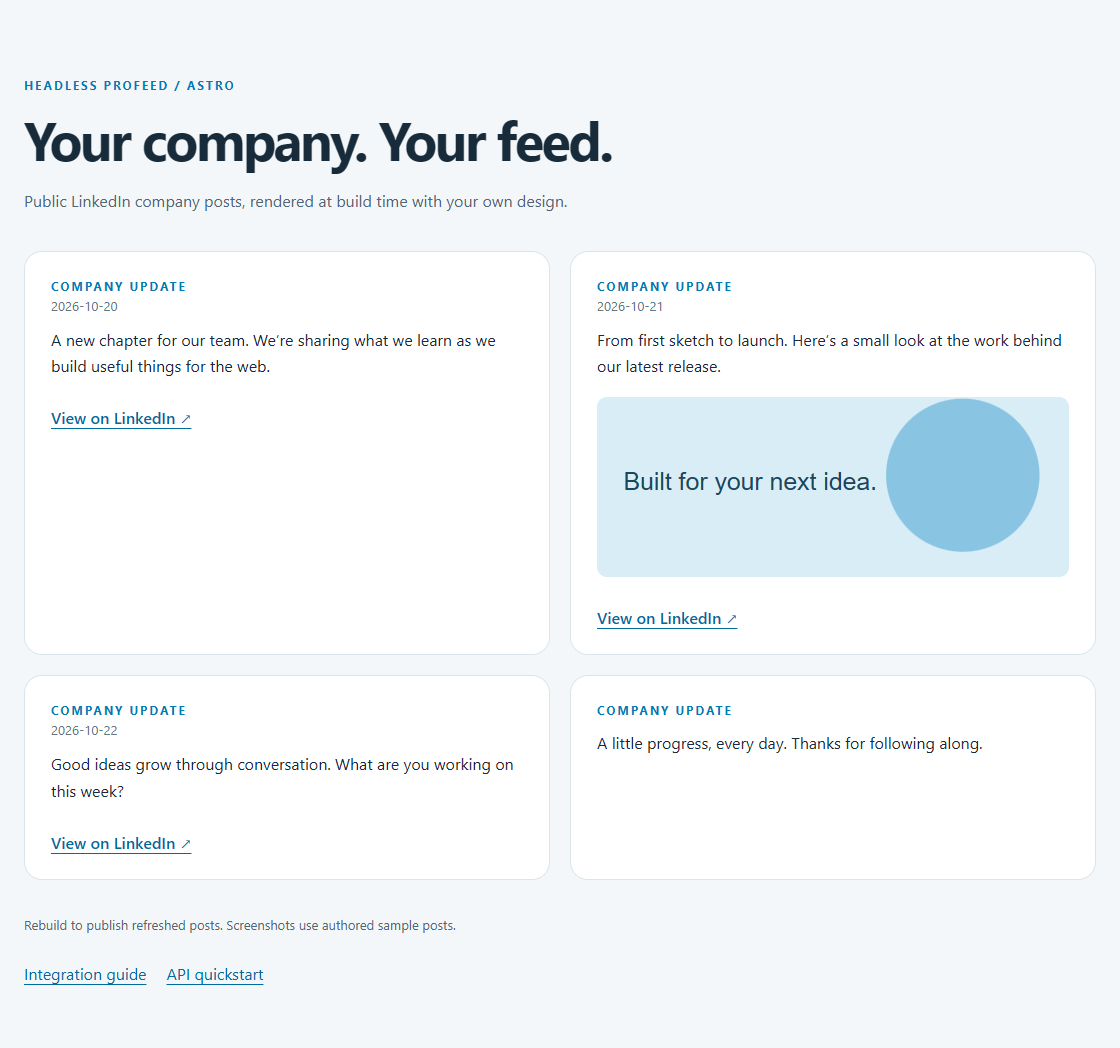
What you will build
Publish public LinkedIn company posts as static HTML generated during an Astro build. The build uses a secret key, then deploys only the posts and styling. Visitors do not need a browser key or client-side JavaScript to see the feed.
Build-time rendering is a good fit when your site already redeploys regularly. The tradeoff is freshness: even if the API has newer posts, an existing static deployment stays unchanged until you rebuild it. Choose Next.js or React if posts must update independently of deployments.
Prerequisites
- Node 22.23.4 or later and npm. This is required by the tested Astro 7.4.2 release.
- For customer mode: an active subscription, configured feed ID and
hp_sk_secret key supplied to the build environment. - A public company or showcase Page you own or are authorized to connect. Headless Profeed is an independent third-party service; it does not support personal profiles or private posts.
1. Install and run locally
git clone https://github.com/ProFeedWP/headless-profeed-examples.git
cd headless-profeed-examples/astro
npm ci
cp .env.example .env
npm run dev
On PowerShell use Copy-Item .env.example .env. The explicit demo mode lets you try the public endpoint without customer credentials. Open the local URL printed by Astro.
astro/.env.example
# Explicit demo mode. No credentials are needed for the public demo.
PROFEED_MODE=demo
# For your own feed, set mode=customer and uncomment both settings below.
# PROFEED_FEED_ID=YOUR_FEED_ID
# PROFEED_SECRET_KEY=YOUR_SECRET_KEY
# Browser keys must allow the EXACT origin shown by your local server.
For your feed, connect the authorized Page in your account, create a secret server key, then set PROFEED_MODE=customer and both customer settings. Restart the dev server. In production, supply the same settings through CI/build secrets. Never use a PUBLIC_ prefix for the key or commit your .env file.
2. Fetch during the build
The page’s frontmatter calls the API helper. Pending or failed collection stops the build with a clear error, rather than publishing an empty feed as a success. A completed 200 response with no posts is a valid empty result and can be published.
astro/src/pages/index.astro
---
import { configuration, readFeed } from '../../lib/feed.mjs';
import '../style.css';
const config=configuration({mode:import.meta.env.PROFEED_MODE,feedId:import.meta.env.PROFEED_FEED_ID,
  key:import.meta.env.PROFEED_SECRET_KEY,base:import.meta.env.PROFEED_API_URL});
const result=await readFeed(config);
if(result.state==='pending'||result.state==='error')
  throw new Error('Headless Profeed build stopped: '+result.message+' Retry after '+(result.retryAfter||30)+' seconds.');
---
<!doctype html><html lang="en"><head><meta charset="UTF-8"/><meta name="viewport" content="width=device-width"/><title>LinkedIn feed · Astro example</title></head>
<body><main><p class="eyebrow">Headless Profeed / Astro</p><h1>Your company. Your feed.</h1>
<p class="intro">Public LinkedIn company posts, rendered at build time with your own design.</p>
<section aria-label="Company posts" data-state={result.state}>
{result.message&&<p class="status">{result.message}</p>}
{result.stale&&<p>These posts were cached at build time. Rebuild to update this page.</p>}
<div class="feed">{result.posts.map(post=><article class="post"><div class="eyebrow">Company update</div>
{post.date&&<time datetime={post.date}>{post.date}</time>}<p>{post.text}</p>
{post.image&&<img src={post.image} alt="" loading="lazy" referrerpolicy="no-referrer"/>}
{post.url&&<a href={post.url} target="_blank" rel="noreferrer">View on LinkedIn ↗</a>}</article>)}</div>
</section><footer>Rebuild to publish refreshed posts. Screenshots use authored sample posts.</footer>
<nav class="links"><a href="https://headless.profeedwp.com/guides/astro-linkedin-feed">Integration guide</a><a href="https://headless.profeedwp.com/docs">API quickstart</a></nav>
</main></body></html>
Astro explains that requests for a prerendered page execute at build time in its data fetching guide. Keep secrets in frontmatter/build code; do not move this request into a client script or expose it through public environment variables.
3. Add the API helper
The helper verifies server-key configuration, checks 202 before response.ok, handles retry intervals, and normalizes optional fields. Text is escaped by Astro’s template rendering; URLs are validated before use. Only the returned public posts become HTML.
astro/lib/feed.mjs
export const API_URL = "https://api.profeedwp.com/api/headless-profeed/v1";

export function configuration(env, browser = false) {
  const mode = env.mode;
  if (mode !== "demo" && mode !== "customer")
    throw new Error("Set the feed mode to demo or customer. See .env.example.");
  const base = (env.base || API_URL).replace(/\/$/, "");
  const url = new URL(base);
  if (
    url.protocol !== "https:" &&
    !(url.protocol === "http:" && url.hostname === "127.0.0.1")
  )
    throw new Error(
      "The API URL must use HTTPS (127.0.0.1 is allowed for fixture tests).",
    );
  if (mode === "demo") return { url: base + "/demo", headers: {} };
  if (!env.feedId || !/^[a-zA-Z0-9-]+$/.test(env.feedId))
    throw new Error(
      "Customer mode requires a feed ID. Copy it from your account.",
    );
  if (!env.key?.startsWith(browser ? "hp_pk_" : "hp_sk_"))
    throw new Error(
      browser
        ? "Customer browser mode requires a publishable key (hp_pk_), never a server key."
        : "Customer server mode requires a secret key (hp_sk_). Keep it server-only.",
    );
  return {
    url:
      base + "/feeds/" + encodeURIComponent(env.feedId) + "/posts?page_size=4",
    headers: { "X-API-Key": env.key },
  };
}

export function safeUrl(value, linkedin = false) {
  if (typeof value !== "string") return undefined;
  try {
    const url = new URL(value);
    if (linkedin)
      return url.protocol === "https:" &&
        (url.hostname === "linkedin.com" ||
          url.hostname.endsWith(".linkedin.com"))
        ? url.href
        : undefined;
    return url.protocol === "https:" ||
      (url.protocol === "http:" && url.hostname === "127.0.0.1")
      ? url.href
      : undefined;
  } catch {
    return undefined;
  }
}

export function retrySeconds(header, fallback = 30, now = Date.now()) {
  if (!header) return fallback;
  const seconds = /^\d+$/.test(header)
    ? Number(header)
    : Math.ceil((Date.parse(header) - now) / 1000);
  return Number.isFinite(seconds) ? Math.max(1, seconds) : fallback;
}

// 202 is an HTTP success but collection has not completed yet.
export async function readFeed(config, signal) {
  const controller = new AbortController();
  const timeout = setTimeout(() => controller.abort(), 15000);
  const abort = () => controller.abort();
  signal?.addEventListener("abort", abort, { once: true });
  if (signal?.aborted) controller.abort();
  try {
    const response = await fetch(config.url, {
      headers: config.headers,
      cache: "no-store",
      credentials: "omit",
      signal: controller.signal,
    });
    const body = await response.json().catch(() => null);
    const retryAfter = retrySeconds(
      response.headers.get("Retry-After"),
      body?.retry_after_seconds || 30,
    );
    if (response.status === 202)
      return {
        state: "pending",
        posts: [],
        retryAfter,
        message:
          "The first collection is pending. Try again after the retry interval.",
      };
    if (!response.ok) {
      const message =
        response.status === 401
          ? "Invalid API key. Replace it in your environment."
          : response.status === 403
            ? "Access denied. Check your subscription, selected feed and exact allowed origin."
            : response.status === 429
              ? "Request allowance reached. Wait before retrying."
              : "The feed is temporarily unavailable. Check the feed status and try again later.";
      return {
        state: "error",
        posts: [],
        message,
        status: response.status,
        retryAfter,
      };
    }
    if (body?.success !== true || !Array.isArray(body.posts))
      return {
        state: "error",
        posts: [],
        message: "The API returned an unexpected response.",
        retryAfter,
      };
    const posts = body.posts.slice(0, 4).map((post, index) => {
      const date =
        typeof post.date_published === "string"
          ? new Date(post.date_published)
          : null;
      return {
        id: String(post.id ?? index),
        text: typeof post.text === "string" ? post.text : "",
        date:
          date && !Number.isNaN(date.valueOf())
            ? date.toISOString().slice(0, 10)
            : undefined,
        url: safeUrl(post.post_url, true),
        image:
          safeUrl(post.image_url) ||
          safeUrl(post.media_items?.find((m) => m.type === "image")?.url),
      };
    });
    return {
      state: posts.length ? "ready" : "empty",
      posts,
      stale: body.refresh?.stale === true,
      message: posts.length
        ? ""
        : "No published posts are available for this feed yet.",
    };
  } catch (error) {
    if (signal?.aborted) throw error;
    return {
      state: "error",
      posts: [],
      message:
        "The feed could not be reached. Check your connection and API configuration.",
      retryAfter: 30,
    };
  } finally {
    clearTimeout(timeout);
    signal?.removeEventListener("abort", abort);
  }
}
4. Add styling and configuration
The following completes the small project. The canonical repository includes its lockfile and test suite for reproducible installs.
astro/src/style.css
:root {
  font-family: Inter, system-ui, sans-serif;
  color: #172b3a;
  background: #f4f7f9;
  font-synthesis: none;
}
* {
  box-sizing: border-box;
}
body {
  margin: 0;
}
main {
  max-width: 1120px;
  margin: auto;
  padding: 64px 24px;
}
a {
  color: #006b9f;
  text-underline-offset: 4px;
}
h1 {
  font-size: clamp(32px, 5vw, 54px);
  letter-spacing: -0.045em;
  line-height: 1.08;
  margin: 14px 0 20px;
}
h2 {
  font-size: 20px;
  line-height: 1.4;
}
p {
  line-height: 1.65;
}
.eyebrow {
  text-transform: uppercase;
  font-weight: 700;
  font-size: 12px;
  letter-spacing: 0.16em;
  color: #007bb5;
}
.intro {
  max-width: 620px;
  color: #526675;
}
.feed {
  display: grid;
  grid-template-columns: repeat(2, minmax(0, 1fr));
  gap: 20px;
  margin: 36px 0;
}
.post {
  background: white;
  border: 1px solid #dbe4e9;
  border-radius: 18px;
  padding: 26px;
  min-width: 0;
}
.post p {
  white-space: pre-wrap;
  overflow-wrap: anywhere;
  margin-top: 12px;
}
.post img {
  display: block;
  width: 100%;
  height: 180px;
  object-fit: cover;
  border-radius: 10px;
  margin: 18px 0;
}
.post time {
  color: #607786;
  font-size: 13px;
}
.post a {
  display: inline-block;
  margin-top: 12px;
  font-weight: 600;
}
.status {
  background: #fff;
  border: 1px solid #cadce6;
  border-radius: 12px;
  padding: 20px;
}
.caption,
footer {
  color: #526675;
  font-size: 13px;
}
.links {
  display: flex;
  gap: 20px;
  flex-wrap: wrap;
  margin-top: 30px;
}
button {
  font: inherit;
  cursor: pointer;
  border: 0;
  border-radius: 8px;
  padding: 12px 18px;
  background: #006b9f;
  color: #fff;
}
button:disabled {
  opacity: 0.5;
  cursor: wait;
}
@media (max-width: 600px) {
  main {
    padding: 36px 18px;
  }
  .feed {
    grid-template-columns: 1fr;
  }
  .post {
    padding: 22px;
  }
}
astro/package.json
{
  "name": "@headless-profeed/astro",
  "version": "1.0.0",
  "private": true,
  "type": "module",
  "engines": {
    "node": ">=22.23.4"
  },
  "scripts": {
    "test": "node --test test/*.test.mjs",
    "dev": "astro dev --host 127.0.0.1",
    "build": "astro build",
    "preview": "astro preview --host 127.0.0.1"
  },
  "dependencies": {
    "astro": "7.4.2"
  },
  "devDependencies": {
    "typescript": "5.9.3"
  }
}
astro/tsconfig.json
{ "extends": "astro/tsconfigs/strict" }
Run npm test, then npm run build. Use npm run preview to inspect dist/. Deploy dist/ only; do not publish .env, build logs containing custom debug output, or server code with embedded secrets.
Caching, rebuilds and freshness
There are two separate clocks: the API’s source collection schedule and your static-site deployment schedule. On self-service paid plans, active feeds are scheduled for refresh every three hours. Enterprise intervals are agreed separately. A build reads available cached posts; it does not force source collection.
Schedule successful rebuilds at the frequency your website needs, with enough spacing to respect API request allowances. When a response is pending, rate-limited or unavailable, wait for the indicated retry interval before starting another build. Preserve your last successful deployment if the next build fails. An empty 200 result can be intentionally published; it is not the same as an unavailable source.
If the API returns stale cached posts, this example labels them at build time. That label and the posts remain static until the next deployment. See refresh and caching and pricing for current behavior and limits.
Troubleshooting
| Symptom | Fix |
|---|---|
| Node engine error | Use Node 22.23.4 or later; do not rely on an older system runtime. |
| Missing customer configuration | Supply both feed ID and hp_sk_ key to the build environment. No automatic demo fallback occurs. |
| Build stops on 202 | Initial collection is pending. Wait for Retry-After, then rebuild. |
| Build stops on 401 or 403 | Replace the key or check the account/subscription. Do not expose a secret in a browser request. |
| Build stops on 429 or 503 | Honor the retry interval and retain the previous successful deployment. |
| Feed stays unchanged | Trigger a new build and deploy its output. Updating an environment variable alone does not rewrite existing HTML. |
| Empty completed page | Confirm the connected Page and its public content. A valid 200 empty feed has its own message. |
The repository checks that pending and error fixtures fail builds and scans the generated output for a server-key canary. Continue with the API quickstart, authentication reference and OpenAPI specification.
Tested source and updates
Code and environment templates on this page are imported from the same pinned repository revision as the preview. The examples are MIT licensed by Accomplice AB. Browse the tested revision, including lockfiles and tests. Check newer framework releases before upgrading your own project.