
Can you retrieve LinkedIn company posts using an API?
Yes. The right route depends on whether you need LinkedIn’s platform capabilities or a read-only feed for a website. LinkedIn’s official Posts API supports publishing and retrieving posts with its own access requirements. Headless Profeed provides an independent REST JSON feed for public company and showcase pages you own or are authorized to use.
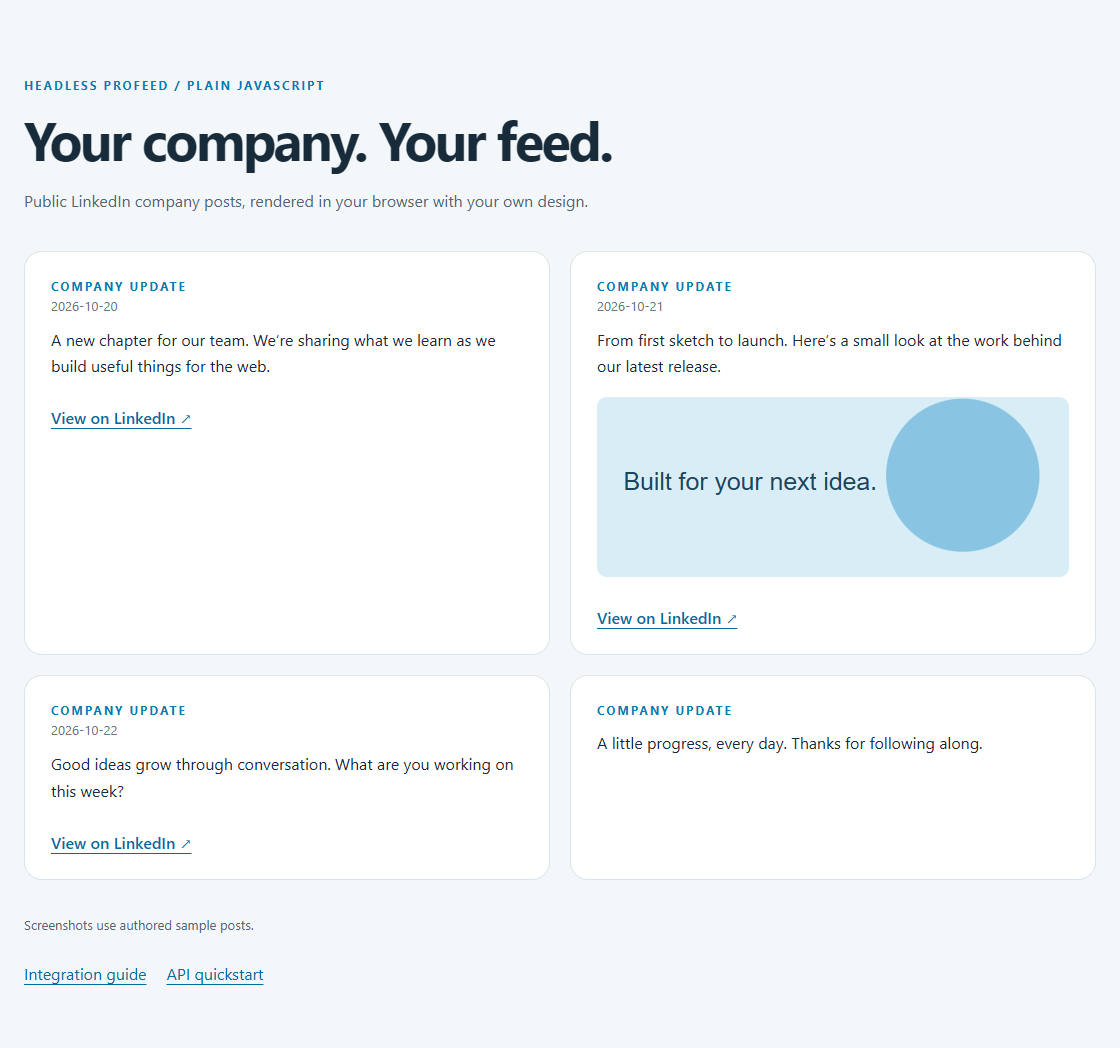
This guide builds a small, styled feed from JSON. It does not require LinkedIn OAuth when using Headless Profeed. Customer feed requests still require an active Headless Profeed subscription and an API key. Personal profiles, private posts and bypassing page authorization are outside the service’s scope.
How the official Posts API works
LinkedIn’s Posts API documentation describes organization retrieval through r_organization_social, restricted to organizations where the authenticated member holds a qualifying Page role: ADMINISTRATOR, DIRECT_SPONSORED_CONTENT_POSTER or CONTENT_ADMIN. Access to the relevant API product and permissions is subject to LinkedIn’s requirements; public visibility alone does not grant unrestricted API retrieval.
Official integrations use LinkedIn authentication and versioned request headers. Choose that route when your application needs LinkedIn’s supported publishing or management operations, and confirm current permissions in the official documentation. Headless Profeed is not LinkedIn’s official API and does not provide those write operations.
Prerequisites
- Node 22.23.4 or later and npm, for the runnable JavaScript example.
- A public company or showcase page you own or have permission to use, when connecting your own feed.
- An active subscription, configured feed and publishable browser key for customer mode. The explicit public demo mode needs no customer credentials.
If you prefer server rendering, use the Next.js guide. For static HTML generated during deployment, see Astro. A reusable browser component is covered in the React guide.
1. Start with the working JavaScript example
git clone https://github.com/ProFeedWP/headless-profeed-examples.git
cd headless-profeed-examples/vanilla
npm ci
cp .env.example .env
npm run dev
PowerShell users can run Copy-Item .env.example .env. Open the URL printed by Vite. The template chooses demo explicitly, so you can see the result before configuring a customer feed.
vanilla/.env.example
# Explicit demo mode. No credentials are needed for the public demo.
VITE_PROFEED_MODE=demo
# For your own feed, set mode=customer and uncomment both settings below.
# VITE_PROFEED_FEED_ID=YOUR_FEED_ID
# VITE_PROFEED_PUBLISHABLE_KEY=YOUR_PUBLISHABLE_KEY
# Browser keys must allow the EXACT origin shown by your local server.
For your own feed, connect the authorized Page in your account, copy its feed ID and create a publishable key. Set VITE_PROFEED_MODE=customer, then uncomment and fill both customer settings. Allow the exact local origin printed by Vite, including its port, and add your final website origin before deployment. Restart the dev server after changing environment variables.
Browser keys are public and read-only. They are scoped to feeds and exact origins; they are not a way to keep the feed’s content confidential. Never put an hp_sk_ secret key into a VITE_ variable. See the authentication reference for key replacement and scope rules.
2. Fetch JSON and recognize pending collection
For a quick credential-free request, this JavaScript logs the public demo response. It checks 202 before response.ok because initial collection is not a completed empty result.
const response = await fetch(
  "https://api.profeedwp.com/api/headless-profeed/v1/demo",
  { signal: AbortSignal.timeout(15000) },
);
if (response.status === 202) {
  throw new Error(`Collection pending. Retry after ${response.headers.get("Retry-After")} seconds.`);
}
if (!response.ok) throw new Error(`Feed request failed: ${response.status}`);
const feed = await response.json();
console.log(feed.posts);
The following is a captured real response excerpt from the public ProfeedWP demo, checked on 24 October 2026. It keeps one post and selected fields; other posts, media fields and pagination are omitted. It is a record of that response, not a live freshness indicator. The preview above uses authored fixture posts so it stays reproducible.
{
  "success": true,
  "posts": [
    {
      "id": "urn:li:activity:7470961060594806785",
      "text": "New feature: PDF carousel support",
      "date_published": "2026-06-11T22:12:00.571Z",
      "post_url": "https://www.linkedin.com/posts/profeedwp_profeed-pdf-post-support-activity-7470961060594806785-l87V"
    }
  ],
  "refresh": {
    "status": "idle",
    "last_success_at": "2026-10-23T22:23:19.244215+00:00",
    "next_refresh_at": "2026-10-24T01:23:19.244215+00:00",
    "stale": false
  }
}
For a customer feed, the URL is /feeds/YOUR_FEED_ID/posts?page_size=4 under the same API base. Send the publishable key in X-API-Key; your browser supplies Origin automatically. Send neither cookies nor a fabricated Origin header.
3. Render the posts safely
The complete browser entry below creates DOM elements and uses textContent for post text. It renders at most four posts, tolerates missing dates and media, and adds a LinkedIn link only when its URL is valid. It aborts requests when the page is left and disables retry until the API’s advertised interval has elapsed.
vanilla/main.js
import "./style.css";
import { configuration, readFeed } from "./lib/feed.mjs";
const container = document.querySelector("#posts");
const status = document.querySelector("#status");
const retry = document.querySelector("#retry");
let controller;
let retryAt = 0;
const text = (tag, value) => {
  const el = document.createElement(tag);
  el.textContent = value;
  return el;
};
async function load() {
  controller?.abort();
  controller = new AbortController();
  retry.hidden = true;
  container.replaceChildren();
  status.hidden = false;
  status.textContent = "Loading company posts…";
  try {
    const config = configuration(
      {
        mode: import.meta.env.VITE_PROFEED_MODE,
        feedId: import.meta.env.VITE_PROFEED_FEED_ID,
        key: import.meta.env.VITE_PROFEED_PUBLISHABLE_KEY,
        base: import.meta.env.VITE_PROFEED_API_URL,
      },
      true,
    );
    const result = await readFeed(config, controller.signal);
    document.querySelector("#feed").dataset.state = result.state;
    status.textContent =
      result.message ||
      (result.stale ? "Showing cached posts while the source refreshes." : "");
    status.hidden = !status.textContent;
    for (const post of result.posts) {
      const card = document.createElement("article");
      card.className = "post";
      const label = text("div", "Company update");
      label.className = "eyebrow";
      card.append(label);
      if (post.date) {
        const time = text("time", post.date);
        time.dateTime = post.date;
        card.append(time);
      }
      card.append(text("p", post.text));
      if (post.image) {
        const img = document.createElement("img");
        img.src = post.image;
        img.alt = "";
        img.loading = "lazy";
        img.referrerPolicy = "no-referrer";
        card.append(img);
      }
      if (post.url) {
        const a = text("a", "View on LinkedIn ↗");
        a.href = post.url;
        a.target = "_blank";
        a.rel = "noreferrer";
        card.append(a);
      }
      container.append(card);
    }
    retry.hidden = !["pending", "error"].includes(result.state);
    retryAt = Date.now() + (result.retryAfter || 0) * 1000;
    tick();
  } catch (error) {
    if (!controller.signal.aborted) {
      status.textContent = error.message;
      document.querySelector("#feed").dataset.state = "error";
    }
  }
}
function tick() {
  const wait = Math.max(0, Math.ceil((retryAt - Date.now()) / 1000));
  retry.disabled = wait > 0;
  retry.textContent = wait ? "Try again in " + wait + "s" : "Try again";
}
const timer = setInterval(tick, 1000);
retry.addEventListener("click", load);
window.addEventListener(
  "pagehide",
  () => {
    controller?.abort();
    clearInterval(timer);
  },
  { once: true },
);
load();
The helper is also part of the runnable project. It validates configuration, filters unsafe URLs and normalizes the API response without injecting remote HTML. It does not expose error response bodies that could contain unexpected details.
vanilla/lib/feed.mjs
export const API_URL = "https://api.profeedwp.com/api/headless-profeed/v1";

export function configuration(env, browser = false) {
  const mode = env.mode;
  if (mode !== "demo" && mode !== "customer")
    throw new Error("Set the feed mode to demo or customer. See .env.example.");
  const base = (env.base || API_URL).replace(/\/$/, "");
  const url = new URL(base);
  if (
    url.protocol !== "https:" &&
    !(url.protocol === "http:" && url.hostname === "127.0.0.1")
  )
    throw new Error(
      "The API URL must use HTTPS (127.0.0.1 is allowed for fixture tests).",
    );
  if (mode === "demo") return { url: base + "/demo", headers: {} };
  if (!env.feedId || !/^[a-zA-Z0-9-]+$/.test(env.feedId))
    throw new Error(
      "Customer mode requires a feed ID. Copy it from your account.",
    );
  if (!env.key?.startsWith(browser ? "hp_pk_" : "hp_sk_"))
    throw new Error(
      browser
        ? "Customer browser mode requires a publishable key (hp_pk_), never a server key."
        : "Customer server mode requires a secret key (hp_sk_). Keep it server-only.",
    );
  return {
    url:
      base + "/feeds/" + encodeURIComponent(env.feedId) + "/posts?page_size=4",
    headers: { "X-API-Key": env.key },
  };
}

export function safeUrl(value, linkedin = false) {
  if (typeof value !== "string") return undefined;
  try {
    const url = new URL(value);
    if (linkedin)
      return url.protocol === "https:" &&
        (url.hostname === "linkedin.com" ||
          url.hostname.endsWith(".linkedin.com"))
        ? url.href
        : undefined;
    return url.protocol === "https:" ||
      (url.protocol === "http:" && url.hostname === "127.0.0.1")
      ? url.href
      : undefined;
  } catch {
    return undefined;
  }
}

export function retrySeconds(header, fallback = 30, now = Date.now()) {
  if (!header) return fallback;
  const seconds = /^\d+$/.test(header)
    ? Number(header)
    : Math.ceil((Date.parse(header) - now) / 1000);
  return Number.isFinite(seconds) ? Math.max(1, seconds) : fallback;
}

// 202 is an HTTP success but collection has not completed yet.
export async function readFeed(config, signal) {
  const controller = new AbortController();
  const timeout = setTimeout(() => controller.abort(), 15000);
  const abort = () => controller.abort();
  signal?.addEventListener("abort", abort, { once: true });
  if (signal?.aborted) controller.abort();
  try {
    const response = await fetch(config.url, {
      headers: config.headers,
      cache: "no-store",
      credentials: "omit",
      signal: controller.signal,
    });
    const body = await response.json().catch(() => null);
    const retryAfter = retrySeconds(
      response.headers.get("Retry-After"),
      body?.retry_after_seconds || 30,
    );
    if (response.status === 202)
      return {
        state: "pending",
        posts: [],
        retryAfter,
        message:
          "The first collection is pending. Try again after the retry interval.",
      };
    if (!response.ok) {
      const message =
        response.status === 401
          ? "Invalid API key. Replace it in your environment."
          : response.status === 403
            ? "Access denied. Check your subscription, selected feed and exact allowed origin."
            : response.status === 429
              ? "Request allowance reached. Wait before retrying."
              : "The feed is temporarily unavailable. Check the feed status and try again later.";
      return {
        state: "error",
        posts: [],
        message,
        status: response.status,
        retryAfter,
      };
    }
    if (body?.success !== true || !Array.isArray(body.posts))
      return {
        state: "error",
        posts: [],
        message: "The API returned an unexpected response.",
        retryAfter,
      };
    const posts = body.posts.slice(0, 4).map((post, index) => {
      const date =
        typeof post.date_published === "string"
          ? new Date(post.date_published)
          : null;
      return {
        id: String(post.id ?? index),
        text: typeof post.text === "string" ? post.text : "",
        date:
          date && !Number.isNaN(date.valueOf())
            ? date.toISOString().slice(0, 10)
            : undefined,
        url: safeUrl(post.post_url, true),
        image:
          safeUrl(post.image_url) ||
          safeUrl(post.media_items?.find((m) => m.type === "image")?.url),
      };
    });
    return {
      state: posts.length ? "ready" : "empty",
      posts,
      stale: body.refresh?.stale === true,
      message: posts.length
        ? ""
        : "No published posts are available for this feed yet.",
    };
  } catch (error) {
    if (signal?.aborted) throw error;
    return {
      state: "error",
      posts: [],
      message:
        "The feed could not be reached. Check your connection and API configuration.",
      retryAfter: 30,
    };
  } finally {
    clearTimeout(timeout);
    signal?.removeEventListener("abort", abort);
  }
}
4. Add the page and styling
Use the following entry page, styles and pinned package manifest to reproduce the preview. The repository also includes the lockfile and fixture tests; npm ci installs the tested dependency tree.
vanilla/index.html
<!doctype html>
<html lang="en">
  <head>
    <meta charset="UTF-8" />
    <meta name="viewport" content="width=device-width, initial-scale=1.0" />
    <title>LinkedIn feed · Plain JavaScript example</title>
  </head>
  <body>
    <main>
      <p class="eyebrow">Headless Profeed / Plain JavaScript</p>
      <h1>Your company. Your feed.</h1>
      <p class="intro">
        Public LinkedIn company posts, rendered in your browser with your own
        design.
      </p>
      <section id="feed" aria-label="Company posts" aria-live="polite">
        <p class="status" id="status"></p>
        <div id="posts" class="feed"></div>
        <button id="retry" hidden>Try again</button>
      </section>
      <footer>Screenshots use authored sample posts.</footer>
      <nav class="links">
        <a
          href="https://headless.profeedwp.com/guides/linkedin-company-posts-api"
          >Integration guide</a
        ><a href="https://headless.profeedwp.com/docs">API quickstart</a>
      </nav>
    </main>
    <script type="module" src="/main.js"></script>
  </body>
</html>
vanilla/style.css
:root {
  font-family: Inter, system-ui, sans-serif;
  color: #172b3a;
  background: #f4f7f9;
  font-synthesis: none;
}
* {
  box-sizing: border-box;
}
body {
  margin: 0;
}
main {
  max-width: 1120px;
  margin: auto;
  padding: 64px 24px;
}
a {
  color: #006b9f;
  text-underline-offset: 4px;
}
h1 {
  font-size: clamp(32px, 5vw, 54px);
  letter-spacing: -0.045em;
  line-height: 1.08;
  margin: 14px 0 20px;
}
h2 {
  font-size: 20px;
  line-height: 1.4;
}
p {
  line-height: 1.65;
}
.eyebrow {
  text-transform: uppercase;
  font-weight: 700;
  font-size: 12px;
  letter-spacing: 0.16em;
  color: #007bb5;
}
.intro {
  max-width: 620px;
  color: #526675;
}
.feed {
  display: grid;
  grid-template-columns: repeat(2, minmax(0, 1fr));
  gap: 20px;
  margin: 36px 0;
}
.post {
  background: white;
  border: 1px solid #dbe4e9;
  border-radius: 18px;
  padding: 26px;
  min-width: 0;
}
.post p {
  white-space: pre-wrap;
  overflow-wrap: anywhere;
  margin-top: 12px;
}
.post img {
  display: block;
  width: 100%;
  height: 180px;
  object-fit: cover;
  border-radius: 10px;
  margin: 18px 0;
}
.post time {
  color: #607786;
  font-size: 13px;
}
.post a {
  display: inline-block;
  margin-top: 12px;
  font-weight: 600;
}
.status {
  background: #fff;
  border: 1px solid #cadce6;
  border-radius: 12px;
  padding: 20px;
}
.caption,
footer {
  color: #526675;
  font-size: 13px;
}
.links {
  display: flex;
  gap: 20px;
  flex-wrap: wrap;
  margin-top: 30px;
}
button {
  font: inherit;
  cursor: pointer;
  border: 0;
  border-radius: 8px;
  padding: 12px 18px;
  background: #006b9f;
  color: #fff;
}
button:disabled {
  opacity: 0.5;
  cursor: wait;
}
@media (max-width: 600px) {
  main {
    padding: 36px 18px;
  }
  .feed {
    grid-template-columns: 1fr;
  }
  .post {
    padding: 22px;
  }
}
vanilla/package.json
{
  "name": "@headless-profeed/vanilla",
  "version": "1.0.0",
  "private": true,
  "type": "module",
  "engines": {
    "node": ">=22.23.4"
  },
  "scripts": {
    "test": "node --test test/*.test.mjs",
    "dev": "vite --host 127.0.0.1",
    "build": "vite build",
    "preview": "vite preview --host 127.0.0.1"
  },
  "dependencies": {},
  "devDependencies": {
    "vite": "8.3.5"
  }
}
Run npm test, then npm run build. Preview the output with npm run preview. Vite embeds browser environment variables at build time, so update them before producing the final deployment.
Limits, caching and content freshness
API reads retrieve the service’s cached posts; they do not scrape LinkedIn again for every visitor. On self-service paid plans, active feeds are scheduled for refresh every three hours. Enterprise refresh intervals and allowances are agreed individually. Initial collection and upstream availability can affect when posts become available. Check refresh.last_success_at, next_refresh_at and stale rather than promising real-time content.
Your plan has feed and API request allowances. See current pricing rather than hardcoding limits into your application. A browser integration makes requests per visitor; a server or static integration can reduce that volume. Extra application caching lowers reads but adds another delay before visitors see new content. Never cache credentials, authorization failures or a pending response as if it were a completed feed.
Respect Retry-After, including HTTP-date values. The complete helper handles both seconds and dates. An empty 200 response is a valid completed result; 202 asks you to wait. Cached posts marked stale may remain useful while collection is retried.
Troubleshooting and common questions
| Symptom | What to check |
|---|---|
| Configuration error | Select demo or customer explicitly. Customer mode needs both a feed ID and the correct key type. |
| 401 | Replace the invalid or revoked key and restart/rebuild. |
| 403 or browser origin error | Check subscription, feed selection and the exact origin. localhost and 127.0.0.1, or different ports, are different origins. |
| 202 with no cards | Initial collection is pending. Wait for Retry-After; do not label it a completed empty feed. |
| 200 with no posts | Collection completed without visible posts. Confirm the connected Page and its public content. |
| 429 | Wait for the indicated interval; check request allowances and avoid retry loops. |
| 503 or network failure | Check feed status, connectivity and service availability. Retry later without publishing an empty success. |
| No image or date | These fields are optional. The example renders text without them. |
Can I use it for any LinkedIn profile? No. It supports public company and showcase pages you are authorized to connect, not personal profiles or private content.
Does fetching force a source refresh? No. Read requests use existing cached data. Manual refresh uses a separate authenticated operation and its own cooldown; see refresh and caching.
Can I remove the styling? Yes. The API provides JSON and the MIT example is yours to adapt. Keep safe rendering, key boundaries and status handling when changing the design.
Continue with the API quickstart, response field reference, OpenAPI specification, or the complete plain JavaScript example on GitHub.
Tested source and updates
Code and environment templates on this page are imported from the same pinned repository revision as the preview. The examples are MIT licensed by Accomplice AB. Browse the tested revision, including lockfiles and tests. Check newer framework releases before upgrading your own project.